
Help:
- UnfoldUnfold First steps
- Unfoldable Specific points
As lexicons you built are meant for many destinations (NLP processing, numeric edition, paper edition, etc.), elements often have many fields corresponding to their content. Sometimes, it can be tricky to get our bearings. This page is here to help you get better the differences between all the content fields.
Normalized content, normalized information... are the one which will be read by computers during NLP processing. They must correspond to the reality and must not need processing based on implicit knowledge to be recreated. For instance, spellings like "priori (a)", "colo(u)r", "joli·e" are not real forms and processing is needed to obtain the real spelling of the forms. Therefore, they are not appropriate in a normalized content field. The appropriate spellings would be "a priori", "color" then "colour", "joli" then "jolie".
Displayed content will be the default one which will be displayed for human reading. You are free to write it as you want, even to let it empty.
Extended content, if filled, will replace the default displayed content for human reading in a numeric edition. Indeed, sometimes, you will need to write things differently in a paper edition (where you have to save space to reduce the printing cost) and in a numeric one (where you have all the space you want), for instance. In these cases, you will indicate an extended content which will be used in the extended (i.e., numeric) edition. In the regular (i.e., paper) edition, the displayed content will be used.
If you don't specify any extended content, the default displayed content will be used in the numeric edition.
Original content is used when you format your XML lexicon from an original one, like the word processing format of a paper dictionary. Sometimes, the information in the original lexicon is not suitable for TEI norm, and you will have to adapt it. Other times, you will want to extend a content which was abbreviated to save space. In all these case, you may want to save the form in which the original content was. You will use the original content field to store this information.
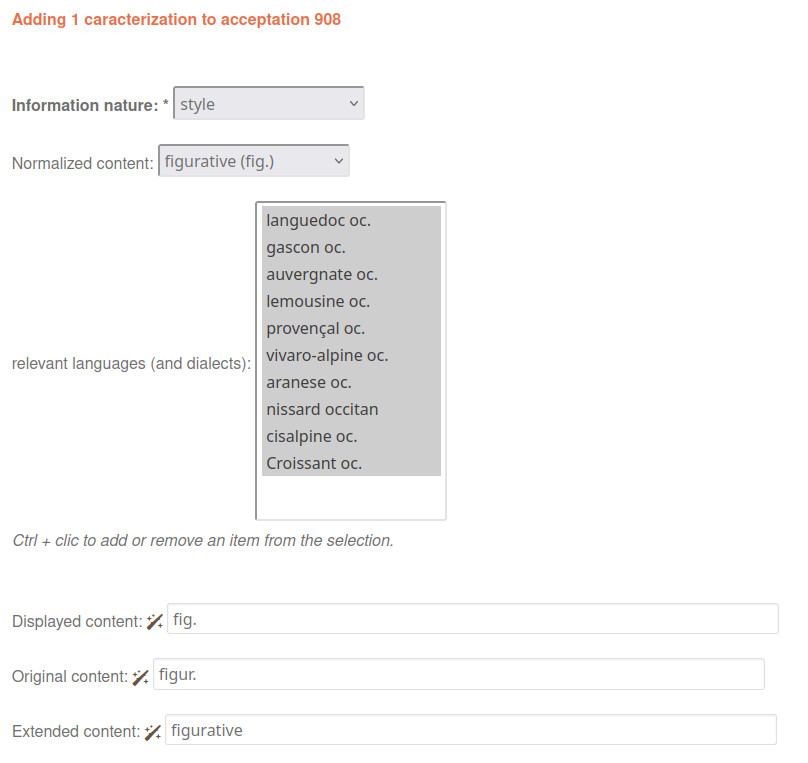
For instance, if an original dictionary indicated a "figur." characterization, you will:
- Choose "figurative" in the "normalized content" field of the characterization
- Store the "figur." information in the "original content" field of the characterization displayed information
- Write "fig." in the "displayed content" field of the characterization displayed information
- Write "figurative" in the "extended content" field of the characterization displayed information
Example of content management for a characterization
If you have unchecked the "Has original information" option in the lexicon details page, the "Original content" field won't display in your forms.
If you have unchecked the "Has extended information" option in the lexicon details page, the "Extended content" field won't display in your forms.